Getting started
Interface overview
The terminal is split into fixed regions. Each keeps its place when you switch markets or timeframes.
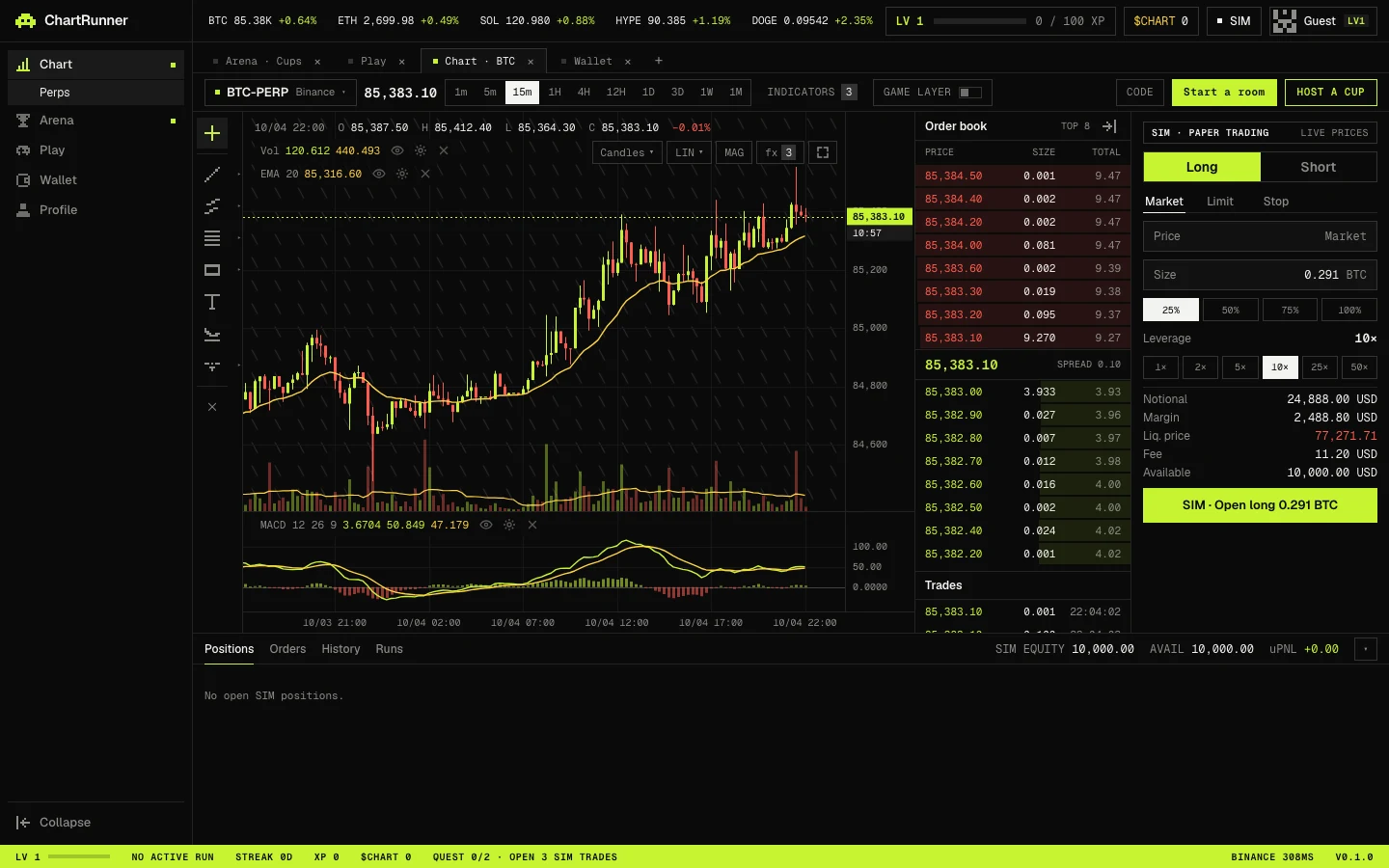
Regions
| Region | What it shows |
|---|---|
| Top bar | Market tickers, the FUNDING rate with a countdown, your level (LV) and XP, your $CHART points, the SIM chip and your account menu. |
| Sidebar | Chart, Arena, Play, Wallet and Profile. The active section shows its sub-pages: Perps under Chart; Trading Cups and Live rooms under Arena; Daily chart, Leaderboard and Verify under Play. Nothing in it is locked by level. |
| Workspace tabs | Open screens as tabs. The defaults are Arena · Cups, Play, Chart · BTC and Wallet. + opens a Chart · ETH tab and × closes a tab. |
| Chart toolbar | Market selector, last price, timeframes, INDICATORS with a count, the GAME LAYER switch, and the room and cup buttons (CODE, which reads JOIN WITH CODE on very wide screens, Start a room and HOST A CUP). |
| Tool rail | Drawing tools and order lines down the left edge of the chart. With the game layer on it also holds the game abilities. |
| Chart | Candles, indicators, drawings, the live price line and your entry line. |
| Order book and trades | Live depth and recent trades. On narrower desktop windows it is hidden. |
| Order panel | SIM order entry with the order summary. |
| Positions drawer | Positions, Orders, History and Runs tabs, with SIM EQUITY, AVAIL and uPNL. |
| HUD bar | The lime strip at the bottom: LV, a run status field, STREAK, XP, $CHART, QUEST progress, the data venue with its latency, and the app version. |
Collapsing panels
- Collapse at the bottom of the sidebar shrinks it to icons.
- The arrow in the order book header collapses the book to a thin strip.
- The ▾ button at the right of the positions drawer header collapses the drawer.
- Maximize chart in the chart's top-right controls hides the order book, order panel and positions. Press it again to bring them back.
On a phone
Below 1024 px the sidebar and HUD bar are hidden. A bottom bar links Chart, Arena, Play, Board (the leaderboard) and Wallet, and the terminal shows Trade, Book and Positions as tabs under the chart. The game switch is labelled GAME there.